INUATEK DCC

Machine monitoring system, PLC to alarm.

A machine monitoring system collects PLC and sensor data, shows it on dashboards and raises an alarm when a value needs attention. Inuatek DCC does this through the gateway you already use, with live status, OEE and condition trends per machine and across the fleet.

OEE, one shift

Example values, try your own

Availability

90%

Performance

85%

Quality

97%

OEE

74.2%

What is machine monitoring?

Machine monitoring

Tracks what the machine is doing, live and over time: running or stopped, output per hour, stop time and the fault behind each stop. It answers whether the machine is producing as it should.

  • Running signal
  • Production counter
  • Fault codes
  • Stop reasons

Machine condition monitoring

Tracks the health of the machine's components so wear shows up as a trend before it becomes a breakdown. It answers whether the machine will keep producing.

  • Temperature
  • Pressure
  • Motor current
  • Vibration

WHAT YOU CAN TRACK

What data can you monitor?

Status and stops

Running or stopped, stop time per shift and the fault code or stop reason behind each stop.

Production counters

Units produced, cycle count and output per hour, the raw material for performance and OEE.

Process values

Temperature, pressure, flow, speed and setpoints, stored as trends so drift is visible over weeks.

Energy and utilities

Motor current, power and consumption per batch or per unit, for cost allocation and efficiency work.

Component health

Vibration, bearing temperature and motor current signatures that show wear before a breakdown.

Alarms and events

Threshold alarms, value changes and combined conditions, delivered by email, SMS or the mobile app.

If the PLC or a sensor holds the value, a gateway can read it. DCC stores every sample with its timestamp, so live status, history and alarms all come from the same data.

SENSOR TO ALARM

How DCC works

  1. Machine data

    The PLC and sensors already hold the signals. The gateway reads them over Modbus, Siemens S7, OPC UA, EtherNet/IP or MQTT.

  2. Gateway

    Secomea SiteManager, IXON, HMS Ewon, Teltonika or any MQTT device sends selected data points to DCC. A SiteManager can also average or filter data at the edge.

  3. DCC dashboard

    Every reading is stored as history. No-code dashboards show live values, trends and calculated KPIs per machine or across the fleet.

  4. Alarm

    Thresholds, value changes or combined conditions trigger an email, SMS or push notification in the DCC mobile app.

OEE SOFTWARE

How OEE is calculated

OEE = availability × performance × quality. Overall equipment effectiveness shows how much of the planned time turned into good units. DCC calculates each factor from signals the machine already has, and the Data Refinement module can write the result into the device's data, for example the OEE for a batch.

Many modern machines do not fit the textbook method, so we agree the definition per machine type. For standardized production, downtime and quality insight across a machine family, see Machine Insights.

FactorWhat DCC measuresCalculation
AvailabilityRunning signal and stop timeRun time ÷ planned time
PerformanceProduction counter and ideal rateActual output ÷ ideal output
QualityScrap or reject counterGood units ÷ total units

Try the calculator at the top of the page: 90% availability, 85% performance and 97% quality give an OEE of about 74%.

ANY CUSTOMER SITE

How remote machine monitoring works

  1. 1

    The gateway opens an outbound, encrypted connection to DCC. No inbound ports are opened on the machine network.

  2. 2

    On a SiteManager, data collection runs separately from remote access, and data is buffered during a connection loss.

  3. 3

    DCC stores every sample point with its timestamp, so a service engineer sees the alarm together with the trend that led to it.

  4. 4

    From the same dashboard, the engineer opens a Secomea or IXON remote session to the HMI without switching tools.

Gadda Automation uses DCC for live fleet dashboards, alarms and reports across crane installations. Read the customer story

See supported gateways
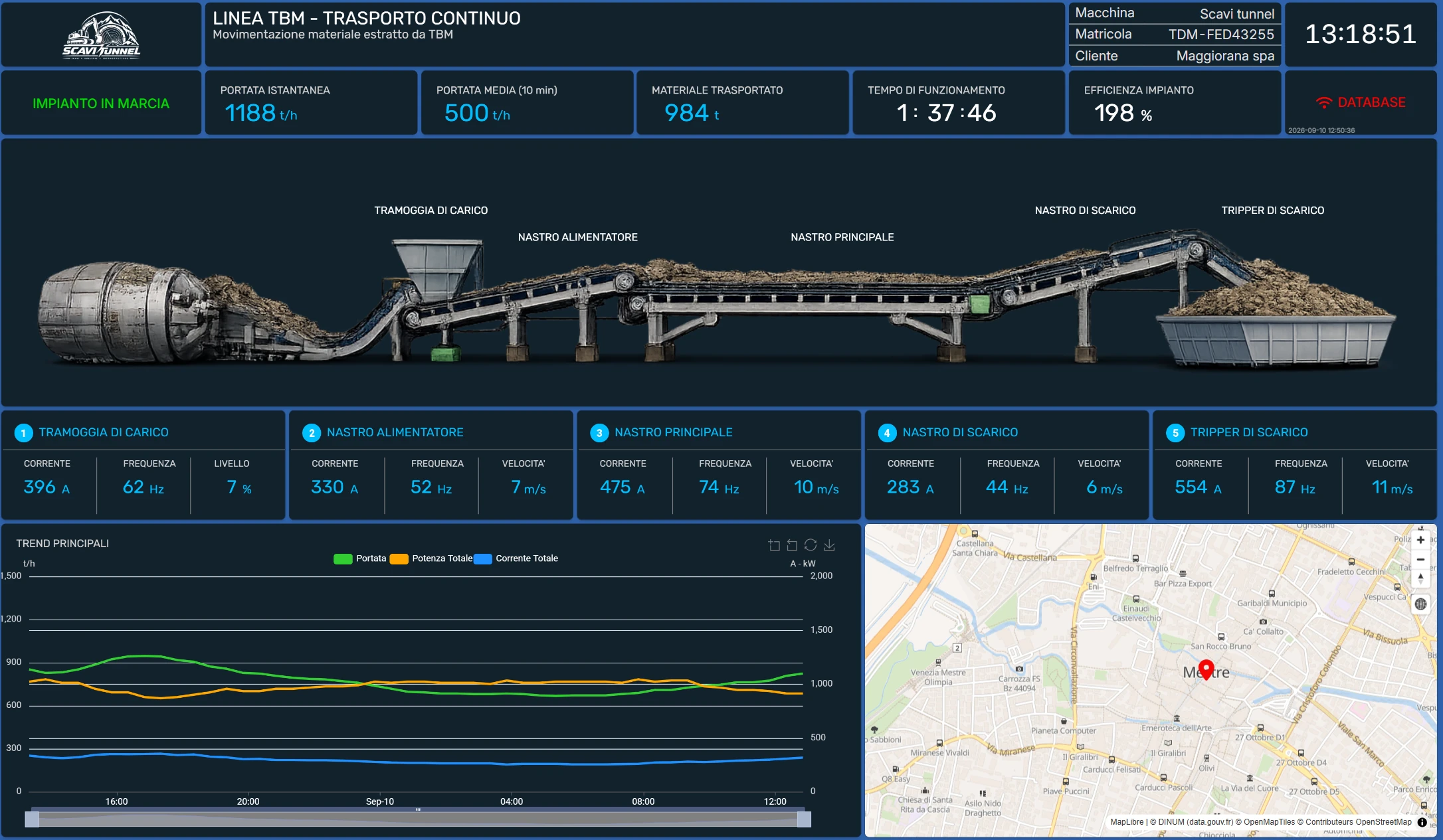
DCC conveyor dashboard with an equipment diagram, throughput measurements, operating trends and a location map
A remote monitoring dashboard for a conveyor line.

SCADA, MES OR CLOUD

How machine monitoring compares to SCADA and MES

Machine monitoring with DCC

Cloud based and fleet wide. One gateway per machine sends selected data points to DCC, where dashboards, alarms and OEE work the same way for every machine at every customer site. No server to install, and new machines join in hours.

SCADA

Runs the machine or the line from a local control room, usually on one site. Excellent for real-time control, but it is built per plant, lives behind the factory network and is not designed to follow a fleet of machines across many customers.

MES

Plans and tracks production orders, materials and traceability for a factory. It answers what should be produced and what was produced; machine monitoring answers how the machine itself is doing. The two complement each other, and DCC data can feed an MES through the API.

Many factories run all three. DCC does not replace the control system; it makes the machine's data available everywhere, to the people who service and improve it.

GETTING STARTED

From one machine to a monitored fleet

  1. 1

    Pick one machine

    Choose a representative machine and the signals that matter: a running signal, a production counter and a few process values are enough to start.

  2. 2

    Connect the gateway

    A Secomea SiteManager, IXON, HMS Ewon, Teltonika or any MQTT device reads the PLC over Modbus, Siemens S7, OPC UA or EtherNet/IP. Most machines connect in a day, often alongside the gateway you already ship for remote access.

  3. 3

    Build the first dashboard

    Live values, trends and an alarm or two, set up in DCC without programming. A first useful dashboard typically takes days, not months.

  4. 4

    Roll out to the fleet

    Copy the setup to the next machines and refine OEE definitions, reports and alarms as you learn. Customers and service teams each get the view they need.

DCC starts at €12 per device per month, so a pilot stays small. See pricing.

Machine monitoring FAQ

What is a machine monitoring system?

A machine monitoring system collects data from a machine's PLC and sensors, stores it as history, shows it on dashboards and raises alarms when a value needs attention. Inuatek DCC does this for single machines and whole fleets across customer sites.

What is the difference between machine monitoring and machine condition monitoring?

Machine monitoring tracks what a machine is doing: running or stopped, how much it produces and why it stops. Machine condition monitoring tracks the health of its components, such as temperature, pressure, current or vibration, so wear and faults are found before they cause a breakdown.

Does DCC calculate OEE?

Yes. With a running signal, a production counter and a scrap or reject signal, DCC can calculate availability, performance and quality and multiply them into OEE. The Data Refinement module can write the result back to the device's data, for example the OEE for a batch. Many modern machines do not follow the textbook method, so we agree the definition per machine type.

How does remote machine monitoring work with DCC?

An IoT gateway at the machine, such as a Secomea SiteManager, IXON IXrouter3 or HMS Ewon, reads PLC data over Modbus, Siemens S7, OPC UA or EtherNet/IP and sends it to DCC over an outbound encrypted connection. DCC stores the data, shows it on dashboards and sends alarms by email, SMS or push notification in the DCC mobile app.

How is machine monitoring different from SCADA or MES?

SCADA controls a machine or line on one site, and an MES plans and tracks production orders for a factory. Machine monitoring with DCC follows the machine itself across customer sites: live status, trends, OEE and alarms in one cloud view. DCC complements both and can feed data to other systems through its API.

How long does it take to get started?

A first machine typically connects in a day through a gateway such as a Secomea SiteManager, IXON or HMS Ewon, often the same gateway already used for remote access. A first useful dashboard with live values, trends and alarms usually takes days, and rolling out to more machines is a copy and refine exercise.

Which alarms can I set up?

You can trigger an alarm on a value change, a threshold or a condition that combines several data points. Notifications go out by email, SMS or the mobile app, and an alarm can also change a visual element on a dashboard.

Start with one machine.

Connect it through the gateway it already has and see OEE, trends and alarms in DCC. Building a service business on your installed base? See solutions for equipment manufacturers. DCC starts at €12 per device per month, see pricing.

Book a demo