
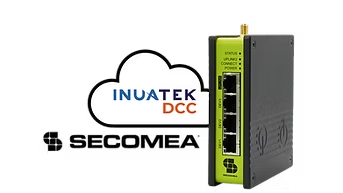
One SiteManager. More value from every connected machine.
Secomea SiteManager is widely used to provide controlled and secure remote access to PLCs, HMIs and other industrial equipment. Its built-in Data Collection Module also collects data from established industrial protocols.
- Siemens S7
- Modbus
- OPC UA
- EtherNet/IP
- HTTP and REST-based sources
DCC turns this data into real-time dashboards, alarms, reports, fleet views and operational insight - without adding another gateway to the machine.
Supported SiteManager models
DCC works with every Secomea SiteManager: the hardware units and SiteManager Embedded, Secomea's software gateway.
- SiteManager 11xx, such as SiteManager 1149
- SiteManager 15xx
- SiteManager 33xx, such as SiteManager 3349
- SiteManager 35xx, such as SiteManager 3549
- SiteManager Embedded
Hardware SiteManagers need firmware 9.6 or later, and DCM must be enabled under your Secomea subscription. The SiteManager setup guide lists the full prerequisites.
Secomea Prime, GateManager and DCC
Secomea Prime is Secomea's zero-trust platform for secure remote access to OT equipment. It brings Secomea's gateways, user access management and data collection together under one name.
The DCC integration works with the Secomea components underneath Prime: SiteManager DCM delivers the machine data, and GateManager handles the remote access sessions you open from DCC dashboards.
More than a standard cloud connection
The integration between SiteManager and DCC goes beyond simply forwarding machine data. It combines four closely connected capabilities.
1. Efficient and secure data collection through SPD
SiteManager DCM communicates with DCC using Secomea’s SPD protocol. SPD was designed for efficient industrial data delivery, including installations using cellular, satellite or bandwidth-constrained connections.
Communication is initiated by the SiteManager and protected using TLS and device-specific certificates. The protocol supports both data delivery and management of the DCM configuration through the same secure communication flow.
Machine builders can therefore connect deployed SiteManagers to DCC at scale without opening inbound connections at the machine site.
2. Graphical DCM configuration in DCC
DCM normally uses a Secomea-defined JSON configuration. Inuatek DCC provides a graphical interface on top of this format, allowing users to configure collectors, protocols, addresses and data points without manually editing JSON.
Configuration errors and validation feedback are shown directly in DCC, simplifying both initial setup and ongoing maintenance.
3. Automatic configuration synchronisation
Configuration changes can be made centrally in DCC and synchronised back to SiteManager DCM. When SiteManager communicates with DCC, it checks for a newer configuration and applies it automatically when cloud configuration updates are enabled.
Administrators do not need to log into every SiteManager individually, and reusable configurations support efficient provisioning across fleets of similar machines.
4. Secomea remote access and machine interaction from DCC
The integration uses Secomea’s API capabilities to connect data insight with secure action. From a DCC dashboard, an authorised user can:
- Open a VNC interface on a connected PLC or HMI
- Open a web-based visualisation or device interface
- Move directly from an alarm or dashboard to the relevant machine
- Write an approved value to a Siemens S7 or Modbus PLC
Controlled write operations
An approved write operation could be used to:
- Acknowledge or clear an alarm
- Adjust a setpoint
- Enter a production batch value
- Change an approved operating parameter
Access depends on the configured Secomea account, permissions and SiteManager connectivity. PLC logic and system design must ensure that only appropriate registers and safe functions are exposed for writing.
From insight to action
Machine data and remote access often live in separate tools. With SiteManager and DCC, an alarm, its historical context and secure machine access can become one coherent workflow.
- 1Receive an alarm from a machine
- 2Open the relevant DCC dashboard
- 3Review current and historical machine data
- 4Launch secure VNC or web access from the same context
- 5Diagnose the issue or perform an approved machine interaction
Designed for scalable machine fleets
The integration is suitable for both individual installations and larger fleets of similar machines.
Reusable provisioning
A standard SiteManager configuration can be prepared and reused when provisioning new machines. When a SiteManager connects, DCC establishes its individual device identity and communication credentials.
Central configuration management
Data collection configurations can be maintained from DCC instead of being managed separately on every SiteManager.
Store-and-forward data collection
SiteManager can buffer collected data during a temporary connection loss and deliver it when connectivity is restored.
Independent remote-access control
Data collection and interactive remote access use separate communication mechanisms. Data collection can continue even when interactive remote access has been disabled through SiteManager’s digital-input control.
Easy SiteManager replacement
A SiteManager can be replaced through the standard GateManager appliance-replacement process without losing the corresponding DCC device identity or historical data relationship.
Built for machine builders
- Add dashboards, alarms and analytics to installed machines
- Improve remote diagnostics and service preparation
- Build customer-facing digital services
- Create recurring value beyond the initial machine sale
- Standardise deployment across machine fleets
Built for industrial operators
- Combine machine insight and remote service workflows
- Reduce the number of separate connectivity components
- Gain centralised visibility across equipment and sites
- Support faster troubleshooting and alarm response
- Maintain controlled access to industrial systems
A technology partnership built around integration
Secomea provides secure edge connectivity, the remote-access foundation and SiteManager data-collection capabilities. Inuatek DCC transforms the collected data into dashboards, alarms, analytics, fleet management and integrated operational workflows.
Together, the technologies help machine builders and industrial companies move from simply connecting to machines towards creating scalable, data-driven services around them.
Frequently asked questions
Which Secomea SiteManager models work with DCC?
DCC works with every SiteManager, both hardware and SiteManager Embedded. The setup guide covers hardware models in the 11xx, 15xx, 33xx and 35xx series, such as SiteManager 1149, 3349 and 3549, with firmware 9.6 or later.
What is Secomea Prime, and where does DCC fit?
Secomea Prime is Secomea's zero-trust platform for secure remote access to OT equipment. DCC integrates with the components underneath it: SiteManager DCM sends machine data to DCC, and remote access from DCC dashboards goes through GateManager.
Do I need DCM in my Secomea subscription?
Yes. SiteManager sends data to DCC through its Data Collection Module (DCM), which must be enabled under your Secomea subscription. Secomea's current packages include DCM in Professional and Premium; check with your Secomea provider if you are unsure.
Can I connect a SiteManager already used for remote access?
Yes. A SiteManager already configured for Secomea remote access can be connected to DCC, and you can keep its existing agents. No extra gateway is added at the machine.